Saturday, August 2, 2008

Setting up RPC over HTTP (S) - Quick & Simple

I have seen several good articles out there on how to set up RPC over HTTP(S). Some of them are pretty verbose and are written for guys who work with MS Exchange on a daily basis. RPC over HTTP(S) is very powerful and has a multitude of setup possibilities depending on the complexity of your MS Exchange Organization. I think many of you out there have a pretty strait forward setup with  just a single MS Exchange Server. You just want a concise step by step on what to do to get RPC over HTTP(S) working quickly. Here is the quick and simple process.

Let's preface the scenario before I give you these steps. Here are the prerequisites:

  • You have a single 2003 MS Exchange Server (no front end server).
  • Your 2003 MS Exchange Server is not serving as a Domain Controller.
  • You have one or more separate Domain Controllers acting with the AD FSMO Role of Global Catalog.

Here is the step by step...

  1. Purchase a Publicly Trusted Certificate for your MS Exchange Server. I can't stress this enough. If you try to use self-signed certificates to secure your 2003 MS Exchange web services it will just produce headaches and extra work for your end users. Technically savvy users will be ok but every day users will not. I recommend DigiCert for your certificate purchases. Their prices are a bargain and I have never had any trouble with their certificates being trusted. If you just need one or two than I recommend the DigiCertSSL. It is only $144.00 per year per certificate. They also offer all kinds of other options including wild-card certificates and specially priced bundles. Take a look at the DigiCert Web Site for more details.

On your 2003 MS Exchange Server:

  1. Install and test that your certificate is installed and comes up as trusted. The easiest way to do this is bring up OWA or some other 2003  MS Exchange web service from outside your network. Make sure the browser has the padlock indicating it is secure and that the certificate listed is the certificate from your selected provider.
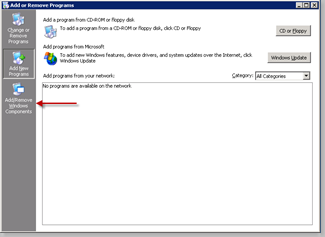
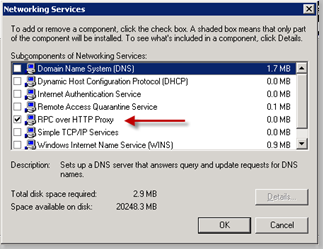
  2. There is a component that must be installed called RPC over HTTP Proxy. It is installed from the Add/Remove Programs Panel. After opening the panel, select Add/Remove Windows Components. image                   Open Networking Services and select RPC over HTTP Proxy.image                   Click OK, Next, & Finish.
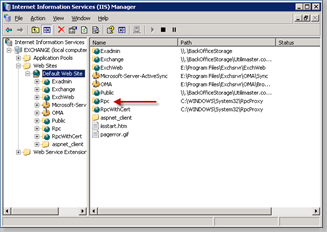
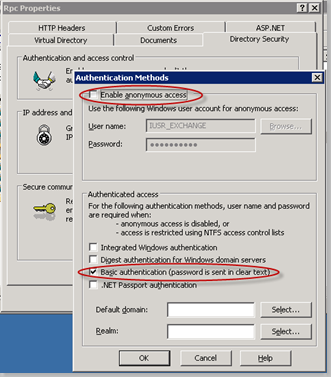
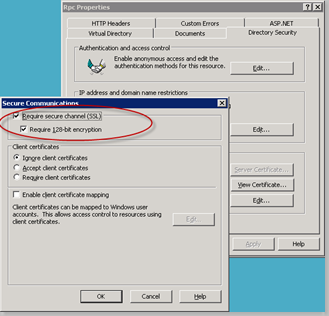
  3. Configure the MS Exchange RPC Web Services for Basic Authentication and SSL. Open the Internet Information Services Manager and expand the Default Web Site. Right-Click the RPC Virtual Directory.image               Select the Directory Security Tab and uncheck Enable anonymous access. Next, check only Basic Authentication under the Authenticated Access section.image              Click OK . From the Directory Security tab click edit under the Secure Communications section. Check Require secure channel (SSL) and Require 128-bit encryption. Click OK, OK and then close IIS.image 
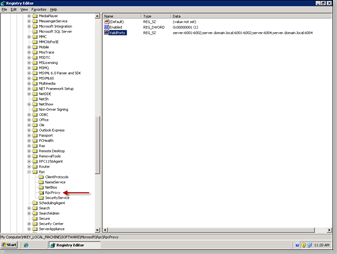
  4. Configure RPC to use required ports for RPC over HTTP(S). This step requires editing the registry on your 2003 MS Exchange Server. I highly recommend that you make a back-up of the registry before making any changes. Open up the registry editor (regedit from the run command box) and browse down to the registry key: HKLM\SOFTWARE\MICROSOFT\RPC\RPCPROXYimage                The registry key we are going to modify is ValidPorts. The key should already be present. We need to modify the key to set up RPC over HTTP(S) to use the port range 6001-6002 and port 6004 for NETBIOS and DNS FQDN connections to your MS Exchange server. Right Click the ValidPorts key and choose modify. In the field data add your server's NETBIOS and DNS FQDN entries for the prescribed ports as I have them set in the sample. Just replace the sample NETBIOS and DNS FQDN names with the names from your MS Exchange server.   server:6001-6002;server.domain.local:6001-6002;server:6004;server.domain.local:6004                                           Once your modifications are complete close the registry editor.
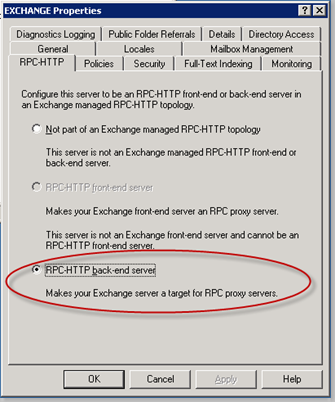
  5. Set the MS Exchange Server as an RPC-HTTP Back End Server. The final setting to make to the MS Exchange server is to configure it as the RPC-HTTP Back End Server for your Exchange Organization. Open the MS Exchange System Manager. Drill down through Administrative Groups, Your Exchange Organization Name, Servers, Your MS Exchange Server Name. Right click on your MS Exchanger server and select properties. Click on the tab labeled RPC-HTTP.          image          Select RPC-HTTP back-end server. Click OK and close the MS Exchange System Manager.
On all Domain Controllers acting as Global Catalogs

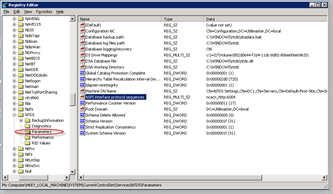
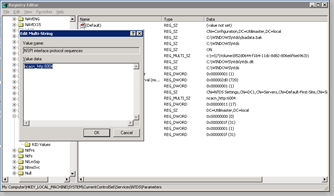
  1. Specify a static port for the Name Service Provider Interface (NSPI) for all Global Catalogs in the Domain. Depending on the size of your network you may have just one Domain Controller with the FSMO Role Global Catalog (GC). However if you have more than a single Domain Controller there may be more than a single GC. The following registry entries will have to be made on any Domain Controller with GC FSMO Role enabled. On your     GC('s) open the registry editor (regedit from the run command box). Browse down to the registry key: HKLM\SYSTEM\CURRENTCONTROLSET\SERVICES\ NTDS\PARAMETERSimage The registry key needed will not yet be present so it will have to be created. With the Parameters folder selected, choose  New from the Edit menu. Select Multi-String Value and name it NSPI interface protocol sequences. Right click the newly created key and select Modify. In the box labeled Value Data enter ncacn_http:6004 and click OK.image               Close the registry editor and restart the Domain Controller.
With all of the above steps complete you now have a working RPC over HTTP(S) server and can use Outlook 2003 or Outlook 2007 from anywhere on the Internet just as if you were in the office. No VPN's required.

Microsoft has published extensive information on RPC over HTTP(S) for not only the scenario mentioned in this post but for any other type you organization may have deployed. Check it out if you would like more information.

Check out my blog posts on Using Outlook 2003 and 2007 with RPC over HTTP(S) for additional information on setting up the client side. Please leave comments if this article was helpful!


Wednesday, April 30, 2008

An Interesting Turn for My Blog ...

I am really impressed how much activity I get on my blog. I had an interesting turn of events on Friday. A small business owner was having some pain with his SBS 2003 install because he did not have a good firewall in front of it. This is at least how I understood his message to me. Here is what he had to say:

Hi Mark,

I stumbled across your blog (and a forum post or 2) while I was searching for info on how to best configure a SBS 2003 server behind a TZ 180. I am the owner of a small steel fabrication business and by default a the one man IT department for our 12 person operation. I have been running a 2 NIC SBS 2003 setup with Exchange for 5 years without a problem, but for a lot of different reasons including lost sleep I just ordered a TZ 180 25 person total secure package to stick in front of it.

Any tips for a dumb welder turned designated IT guy on this? I was assuming that I should keep the 2 NIC setup and figure out how to set up the SonicWALL to accommodate, but I have seen a few recommendations to switch the SBS over to 1 NIC (and your comment that you have deployed "a ton" of SBS 2003 boxes behind the TZ180s prompted this message). We do have a couple of employees using RWW and I would like to continue this.

Our email is hosted by Earthlink and the SBS box goes and fetches it POP3 and then distributes. Recently, I set up a Gmail account that I first forward the Earthlink email to, let Gmail filter, and then pass back to a "clean" Earthlink mailbox before our server downloads. My staff loves me for this as I spare them from a ton of spam. Will the sonic wall box take care of this or do I need to keep the Gmail filter going? Are your typical SBS setups running Exchange, or do you advise hosted Exchange? I am all about doing less IT and more running the business so please steer me toward the more hands off solution...

thanks for your time.

I happen to be in Dallas, TX at the SMB Summit event. I was speaking with Becky Ochs who is the Product Manager for Small Business Server at  Microsoft. They have officially dropped the server from the edge of the network and removed ISA from the Small Business Server. It is now a one NIC box. With what products are available for the SMB space for a firewall, I really think this is a smart move. Anyway's, this could not have been more timely. I put together what I think is a good roadmap on how to add a SonicWALL firewall in front of an SBS Server 2003. Here is my reply:

Overall this should not be a tough move. First off it sounds like you are doing a pretty good job not working in IT and managing your SBS server. I am in Dallas with the Microsoft Product Manager for SBS, Becky Ochs, and her presentation specifically mentioned how SBS will no longer be a two NIC server on the edge of the network. With that in mind the answer to your question is a one NIC setup is where you want to go.

A caveat to making this change is whether or not you are using ISA server. As long as the answer is no then the following steps should make this process simple. Here is what to do.

1. Set-up the TZ180W and connect it to the Internet. The WAN IP setup depends on your service with the ISP. Hopefully you have a fixed IP address. If not I would look into it as everything works better. Register your device and make sure it can get out to the Internet. Set the LAN IP to an address that is unique to the network. My suggestion is if the server has an address near one end of the network like x.x.x.1, set the firewall LAN interface address to x.x.x.254. It is a good practice to keep these addressed to the end of the subnet.

2. With the SonicWALL firewall connected go to the SBS Server Manager and run the Internet Connection Wizard (ICW). During the wizard setup change the NIC settings to a single NIC config. Do not change anything else. This especially includes the server certificate settings. Go ahead and disable the WAN NIC to prevent any confusion.

3. The last step is to give the new Internet path to the workstations. Most likely they get IP addresses from the DHCP server on the SBS Box. An afterthought here is to make certain that DHCP on the TZ180 LAN range is disabled. This is very, very important. The ICW should have fixed the DHCP server but you still may need to open the DHCP MMC and add the new gateway address which is IP address of the LAN interface on the SonicWALL. Reboot the workstations and confirm the can get to the Internet.

If all has gone well and according to plan your internal configuration is complete. The last step is to open up the ports needed for public services on the SBS server. They are as follows:

1. Port 25 for inbound mail on Exchange. I will address this more in a few moments as your mail is setup a bit uniquely. Set this rule up for now but do not turn it on until you are ready to receive Exchange E-mail.

2. Port 80/443 for web based remote services such as xxx.domain.xxx/exchange (OWA) and xxx.domain.xxx/remote (RWW).

3. Port 4125 to allow remote access to servers and workstations via Remote Desktop from the Remote Web Workplace

4. Port 444 if you allow access to the companyweb from the Internet

5. Port 1723 if you allow Microsoft VPN access to you network.

That should get everything working and in a single NIC configuration using the TZ180W as the new firewall/gateway.

As far as Exchange goes, I would dump all that complicated email travel and use the server you are paying for. If SPAM is a concern there are a couple of great solutions. One is to use Postini which is owned by Google. The cost per user is really pretty low. You could also use a software product like Sophos Pure Message for SBS. This works pretty well too and will eliminate most all SPAM. A third choice and my preference is a SonicWALL E-Mail Security device which installs very easily and like software or an outside service will filter all your email. In my opinion E-Mail Security gives you the most control, flexibility, growth, and value. It is totally hands off and will proxy your email if the server goes down for any reason as long as your connection the Internet is still in place.  You can have one email address per user  that is web accessible, will sync to a windows phone in real time, and will work with Microsoft Outlook 2003 or later at home or anywhere else you have a connection on the Internet. It is ROCK SOLID and all my SBS users engage Exchange as their email server.

After getting a reply back from the sender I figured this was good data for the community and I should get it out here the the general public. Hope it helps all!


Friday, April 18, 2008

SonicWALL NSA E-Class looks to be a big win for Willow Creek Community Church

Anyone one who knows me or reads my blog can be certain of one thing. I like SonicWALL products. The company's product line is growing and maturing so fast it is incredible. This growth charge is being lead now by the Enterprise Class firewalls or E-Class as they are known. These products are changing the landscape and have raised the bar in performance and throughput. There is not another enterprise class product on the market that can do what the E-Class firewalls do. When you consider the price, the E-Class is by far the best value for the dollar.

I have to say that working with churches is always an honor. I just completed a job for Willow Creek Community Church, a church known not just here in the United States but worldwide for it's service to Jesus Christ. Having been given the trust of a church of this size and stature in the ministry is nothing less than a true God thing. Kudos to Kurt Donnan and his team at Willow Creek for the opportunity.

The project was to replace their SonicWALL Pro 4060 which has been in service for about three years. It currently has a 45 Meg connection via a DS3 and was pretty much at its limit handling what the Willow network was throwing at it. The replacement for the Pro 4060 was to be a pair of brand new E-Class NSA 6500 Firewalls. They were to be installed in a High-Availability pair to not only upgrade the capability at the head end of the network but to also add a layer of redundancy as the previous install was a single point of failure for the network.

Now, as anyone who has cut over the gear connecting a big network to the Internet knows, this can be a nightmare for the users if the project is not well thought out and carefully executed. Down time is never really acceptable and can ultimately create a black eye for the IT department of any network. This was no different at Willow Creek. Fortunately, SonicWALL made this process much easier by allowing the content rules and programming of the Pro 4060  to be importable into the new E-Class. I was not about to take for granted that this would work smoothly so Kurt, myself, and his team all diligently reviewed every rule, process, and custom bit of configuration that was imported to the E-Class device. When done the only thing we found is that some orphaned firewall rules that really should have not been in place on the Pro 4060 were successfully cleaned up and purged from our new configuration. That was the first sign things were really headed in the right direction. We went ahead and shut down the Pro 4060 and lit up the E-Class box to the production network. The outbound connections all came up with no issues at all. As we audited inbound traffic we noticed that connections were not being made. My suspicion was that some NIC's were not happy about the hardware change in real time and mid-stream. I simply rebooted the E-Class gear and the servers that were not communicating. Every single connection came online and worked flawlessly. Total time from Pro 4060 shutdown to E-Class NSA 6500 assuming all network functionality was less than 10 minutes. For the end uses at Willow Creek the change was totally transparent. The quote was "It can't be that easy. This was the easiest cut-over we have ever done." I really can't take the credit here. Kudos to SonicWALL and the engineers that developed the NSA E-Class products. They are simply awesome!

Post conversion I thought we should test the new install performance. The inbound connection is 45 MB over a DS3 so we should have been able to get the E-Class to show us some real use with the network in production. Here is a snapshot of the E-Class on a Monday just after conversion with podcasts, credit cards, browsing, email, downloads, and everything else going on.

Willow on E6500

Can you say yawn? Only 2 CPUs were in process! To be fair it was later in the day but we  still thought there would be more load then that. This was with all the UTM (Unified Threat Management) turned on. To just push the issues we decided to max out the DS3 with 7 simultaneous downloads of Vista SP1, several video streams, -t pings to outside servers, etc. The graph of the DS3 showed it right at the top of its inbound limit. Below is the graph of the E-Class CPU graph.

Willow with DS3 Tapped

We managed to get 5 CPUs engaged. CPU 2 actually got to 41% for a brief second but I could not snap the photo quickly enough. When we ran this test we had already installed the second E-Class for a High Availability fail-over. We pulled the plug on unit one and the only thing we lost on all the stuff that was running was one ping at about 30 ms.

The E-Class boxes are a great product. If you have a Cisco, Juniper, Fortinet, Watchguard, or any other firewall solution or are looking to make a change, contact Willow Creek and see what they think. I think they will tell you to give the E-Class some serious consideration. In the ministry space as well as any other market there is no other product that can come close to providing top value for the ever shrinking IT dollar.


Friday, April 11, 2008

Microsoft does VoIP for the small to medium business!

Did you know that Microsoft has a VoIP system? Well they do and so far I really like it. They are OEMing the software to several hardware companies to build and integrate into a  system. The company I have chosen to start with is D-Link. I have never thought of D-Link as a higher end hardware company but this system is a pretty big departure from the home grade equipment I have used from them in the past.

003008 007    004     

Getting back to the topic at hand... The Response point system is an SMB  to Medium Business VoIP solution with a host of features, bells, and whistles. The features have really been crafted carefully to meet the needs of this space. Most mid-sized PBX phone systems as well as bigger VoIP systems, like those from Cisco, have a pretty big up-front cost. I have sold several mid-sized phone systems and it is nothing to get up to seven to ten thousand dollars. The Response Point system bundled as a 10 user set with a four line PTSN gateway(regular old business lines on copper) can install and be ready to go for less than four thousand dollars complete. Some pre-requisites to that number are a good quality switch but not necessarily something in the layer 3 arena, a good basic network with a really good firewall/router (a SonicWALL TZ180 or similar) but preferably a server like a Small Business Server, and good documentation as to what is already in place. Unfortunately, my first deployment did not have these qualifications in place so it was a little more difficult then it had to be.

The feature that really make the system a winner in my opinion is that everything is voice activated. The phones have a little blue button with the Response Point logo and that is the key to the whole system. For example, if a call comes in and you have a receptionist she can transfer that call by hitting the magic blue button and saying "Transfer to Mike." The system confirms by automated voice that the call will be transferred to Mike and confirms that the attendant can now hang up the phone. Intercom calls are simple pressing the blue button and saying "Call name or Extension number. Calls can also be made to predefined lists that are customized to each user. Out side calls are very similar to intercom  calls. The user just states the name on the list. These names can come from any number of sources but the really big plus is that it is integrated to Microsoft Outlook for its contacts and it is seamless. There is a client that installs on the workstations and adds complete management of the user's phone right from the computer screen without having to navigate any cryptic menus. Calls to the users phone show a pop-up with the inbound caller's name, caller-id, or both.

Retrieving voice mail can really be a pain. Leave it to the Response Point system to make it a breeze. The users can choose to forward all call to an outside line like a cell phone. Better yet, if you don't want to ring up all the extra minutes you can have all your voice mails bound to an email and sent to you in an audio file. It is not a 40,000 unified messaging system but this really does fit the bill for those with five to seventy-five users. No guessing on when a message came in or who it was from. All that is included right in the email. Listen to the messages from a computer, smartphone, blackberry, or anything else that can receive an email.

I saw this system back in September of '07 at the SMB Nation Event in Seattle at the Microsoft campus. It was impressive then and now that I have a demo and one installed it is truly an incredible value for the power. I wish it had  T1 & PRI gateways as well as a VoIP gateway to interface with VoIP providers worldwide. I hear that is coming though. That would nearly eliminate the need for copper dial-tone altogether. No dates yet on these features but stay tuned. Right now D-Link is selling the systems faster than they can make them. On average the wait time has been thirty days or even longer. Several shipments have made it to the states from over-seas assembly facilities and all those shipments have been bundled into 5 and 10 user skews. Individual phones and gateways are just now becoming available for larger deployments and I am already taking orders for installs with more than ten phones.

Microsoft has a great online demonstration of the system. Follow the link and take a look for yourself. It looks to be a blockbuster solution.

Friday, February 29, 2008

Back again from a long break ...SonicWALL Peak Performance a real win!

Business has been crazy since I last blogged at the Mind Sharp SharePoint tanning. I keep trying set aside time each week to blog but it has been very difficult. I happen to be flying again right now and flights are a great time to catch up.

SonicWALL has just completed their Peak Performance 2008 partner event and it was a real win in my opinion. It was hosted in Las Vegas and they decided to have the event at the Venetian property. Our rooms were in the Palazzo Towers and let me tell you...the rooms were very nice! Take a look at some of the room photos. The accommodations really made time in the room an unexpected treat.

img026        img027    img025      img033    img023    img024    img032 img030

I have felt since the early days of working with SonicWALL products that SonicWALL was very committed to their craft. The acquisitions they have made the past couple of years have added a rich and diverse product line and have made it easier for me to offer a complete set of solutions to my clients. The line card now includes the following:

    • SMB Firewalls with diverse and unique Unified Threat Management (UTM). The units filter at the packet payload level and remove spyware, viruses,  & limited spam. They also offer website content filtering and offer a unique ability to filter known and unknown complex intrusion techniques to your internal network.
    • Enterprise Class firewalls (E-Class Firewalls) with up to 16 Core CPUs for a tested WAN throughput that exceeds 1.5 Gigabits. The E-Class systems maintain that throughput with the Unified Threat Management scanning all inbound and outbound traffic. They have all the functions of the SMB firewalls but are enterprise fast and scalable to high availability pairs. There is nothing out there from any other vendor with this level of speed and function. That includes Cisco, Barracuda, & Juniper.
    • E-Mail Security Software and Appliances that function as local pre-email server analyzers and proxies that are scalable to multi-devices scenarios and able to handle more then 1,000,000 messages per day. The only real limits will be in the amount of bandwidth available to the site. (E-Mail Security)
    • Continuous Data Protection (CDP). Currently 4 available appliances that range from 400 GB to 1.2 TB of disk to disk real time back-up. The solutions scale from backing up servers and workstations on the LAN to capturing data from remote systems the attach via the VPN. There is integrated support to natively backup Microsoft Active Directory, Microsoft SQL Server Databases, & Microsoft Exchange information stores. The solution scales even further to allow offsite back-up to the SonicWALL World Wide Network or to another CDP within your own multi-site network. The new hardware to be released yet this year will have the ability to grow with replaceable disks at starting sizes that range from one to six terabytes of total back-up storage. The package also comes with ability to snapshot hardware at the Bare Metal for quick and simple restores that later this year will be hardware independent.
    • SMB & Enterprise SSL-VPN is a very slick technology that simply said provides a higher level of security to networks that must have a higher level of control on who and what connects to their LAN. Rather then direct VPN connections of external hardware or remote systems to your LAN, the users are offered a web connection via a browser and will proxy what ever services you choose to make available. For the most trusted hardware there is a client based VPN that can still be used and access is given on a policy by policy basis. It is compatible with MAC and Windows and on the higher end even with Linux and Windows Mobile devices. The devices range from 10 users models to models that support over 500 uses all in the SMB space. For larger networks that need an enterprise class solution with High Availability and End Point Control, the E-Class SSL-VPN appliances scale as far as the imagination will take them. Taking the solution a step further, there is now a new tech support option called Virtual Assist. This is a technician tool that allows remote control of remote systems with no client needed. It is very similar to a Live Meeting or Web-Ex tech support solution. It scales from one to as many users as you like depending on the number of concurrent connections your technicians may need.
    • Managed Wireless that is 100% centrally managed from a single GUI. The SonicWALL Sonic Point is the unique SonicWALL 802.11 radio that is controlled from the Firewall UTM appliance GUI. To set up your wireless network all you do is build the profiles via the Firewall GUI and plug them in. That's it. The solution provides guest level access and will provide multiple SSID's with different levels of security and all done over one physical set of radios. The current radios are available in A/B/G and B/G. Later this year there will also be a radio that will support B/G/N.

This is some really cool stuff. Even more exciting is that all of these lines are getting big, big feature updates that will make every single item above work better, faster, and more reliably. Some of the release dates are still to be determined so as these dates approach I will elaborate in much more detail as to what is coming. Stay Tuned !!!!

SonicWALL is a key vendor in my business and after this event it is clear that they will continue to be a key partner. Quite frankly they are going to be even more important in the evolution of what I do in the commercial, enterprise, and ministry space. Kudos again to SonicWALL and thanks for a great four days in Las Vegas!

Sunday, June 17, 2007

Windows Vista and Microsoft Small Business Server

Well, I finally took the plunge out of necessity and am now a user of Microsoft Windows Vista. I had planned to wait a while longer but I had no choice. I update my Tablet PC's every three months or so and put my current model out to my client base and on E-Bay as demos to keep the latest technology in hand. It's not usually a big deal. I can reformat a system in no time. However, with Vista that was not the case for the first time through. I thought about just taking an existing XP license and plopping that on the system but with a ThinkPad Tablet that didn't look like a great idea.

It took about a day of fooling around with the system to get comfortable enough with Vista to find all the stuff I needed to get my data put back and to rejoin to my MS 2003 Small Business Server. There were two major issues during the whole ordeal. The first was figuring out how to create and manage a VPN connection. I had some trouble getting the IP from my SBS VPN connection. I found that I needed to fully patch my SBS Server. There were several patches that are required on SBS 2003 when you want to attach a Vista client. That was the easier of the two main problems.

The second problem was that like many users, I use a self-signed certificate for all the remote connectivity. In Vista, even when logged on as an administrator you can not install self-signed certificates to the "trusted root certification authority". There are a couple of new steps that differ from XP and IE 7. The first is that you have to start IE 7 in an admin mode that runs with "Protected Mode" turned off. The trick is to right click on the IE 7 icon and there will be an option to "Run As Administrator". Of course this will only appear if you actually have admin rights. Once you have started the browser in admin mode you will notice that "Protected Mode" is now off as indicated in the bottom status bar. Now to get your cert installed browse to a secure site from your SBS server like Outlook Web Access or Remote Web Workplace. Click through the certificate error and at the top of the browser next to the address bar will be a certificate error shield. Click the shield and in the dialog box select the "View Certificate" button. A wizard will start and there is an option to install the certificate. Like before in XP you will want to install the certificate in the "Trusted Root Certification Authorities". The difference in Vista is that you must check the box "Show physical stores", expand "Trusted Root Certification Authorities", and select "Local Computer". If you do not take these extra actions you will swear you have lost your mind. The certificate looks like it has installed but it just goes into digital oblivion. Close the browser to close the admin session and re-open IE 7. Browse to the same site on your SBS Server and you should now get to your site with no certificate errors. A padlock should now appear where the error shield was before.

I am still learning Vista and will likely post more soon. These items are pretty crucial for SBS so I am glad to share them with all you other SBS'ers out there. See you all out in Seattle again this year at the end of September at SMB Nation.